
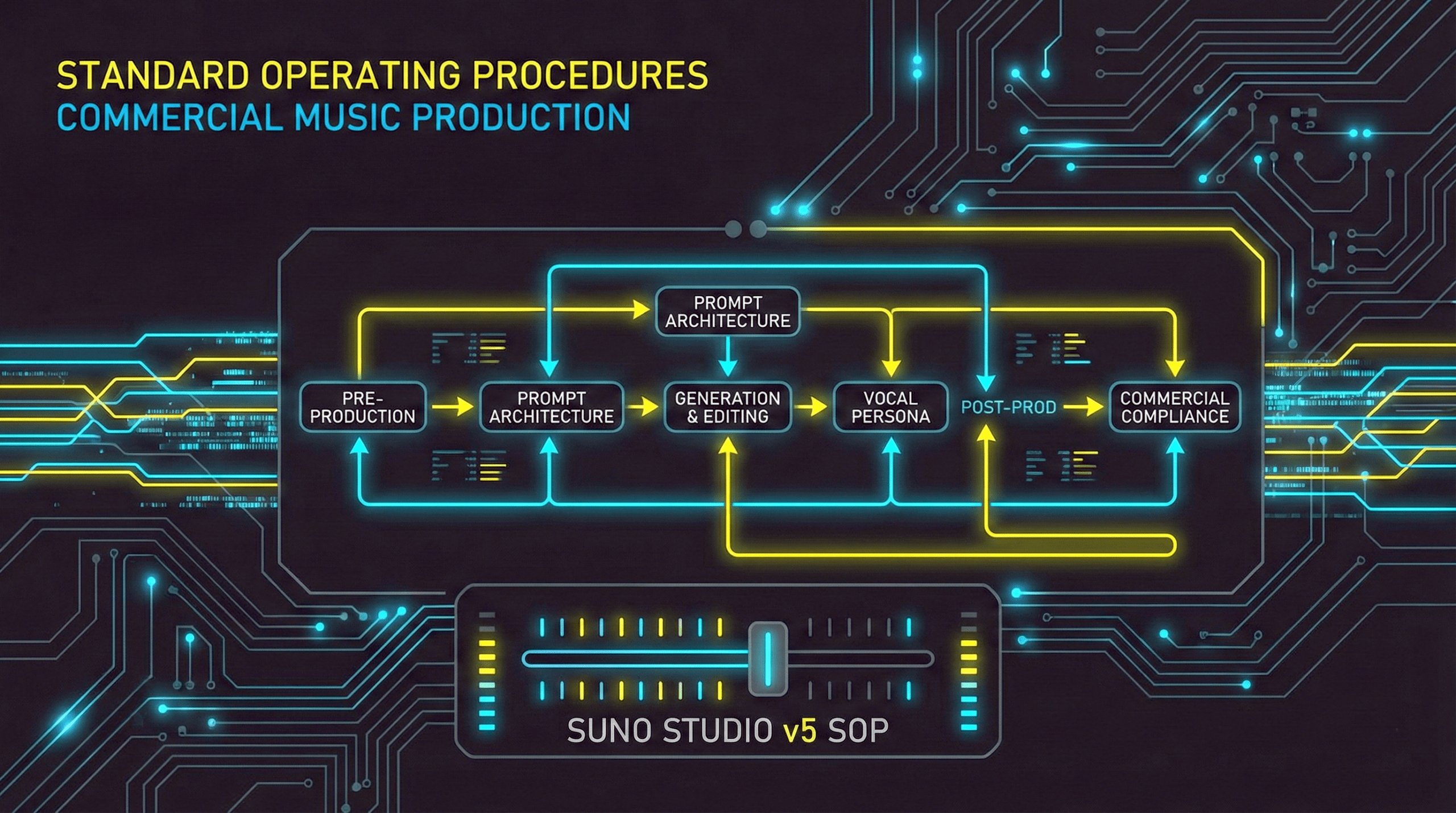
Standard Operating Procedures: Commercial Music Production with Suno Studio
1.0 Purpose and Scope
1.1 Introduction
To maintain our competitive edge, the adoption of a standardized workflow for AI-assisted music creation is not optional; it is a strategic mandate. These procedures are the official protocol for ensuring consistency, commercial viability, and rigorous quality control when utilizing Suno Studio for all professional projects. The core purpose of this Standard Operating Procedure (SOP) is to provide a repeatable, end-to-end workflow for production teams creating commercially viable music with Suno Studio v5. This document covers the entire production lifecycle, from initial concept and prompt architecture through to external mastering and final licensing compliance checks. The entire process is predicated on the foundational principles of diligent pre-production planning.
1.2 Key Terminology
The following terms define core concepts within the Suno Studio v5 production environment.
| Term | Definition |
| Generative Audio Engineering | The professional discipline of moving beyond simple text-to-audio conversion to a sophisticated process of sculpting AI-generated output. This represents a strategic shift from “rolling the dice” with early models to meticulously “sculpting the output” through structured prompting, editing, and hybrid workflows. |
| Nonlinear Timeline | The DAW-like interface paradigm in Suno Studio that allows generated audio to be treated as editable “regions” or “clips” on a timeline, replacing the older, linear “Chain” logic. |
| Subtractive Production | A surgical editing method enabled by stem separation, where unwanted generated elements (e.g., a specific drum fill) can be removed from a track by deleting their corresponding stem, preserving the rest of the generation. |
| Hybrid Workflow | The professional standard of integrating Suno Studio with a traditional Digital Audio Workstation (DAW), using the AI as a source for raw audio stems which are then edited, mixed, and mastered externally. |
2.0 Phase 1: Pre-Production & Prompt Architecture
2.1 Introduction to Pre-Production
Let me be unequivocal: the pre-production phase is the single most critical determinant of project success. Failure to meticulously plan here guarantees budget overruns and commercially unviable output. The following protocols are mandatory for defining a track’s core identity before the first generation credit is spent.
2.2 The Four Pillars of Prompting
An effective prompt is built upon four distinct pillars. Neglecting any one of these dimensions will result in the model reverting to a generic, commercially unviable sound.
- Genre & Sub-Genre Architecture Specificity is the key to unlocking unique and authentic sounds within the model. Broad genre terms must be avoided in favor of detailed, hybrid descriptors.
- Weak:
Electronic Music - Strong:
Cyberpunk Industrial Techno
- Weak:
- Mood & Emotional Mapping The model translates abstract emotional concepts into harmonic language, directly influencing chord progressions, tempo, and dynamics.
- Weak:
Sad song - Strong:
Melancholic, anxious, introspective
- Weak:
- Instrumentation & Textural Design Describe the timbre and character of the instruments, not just their presence. This provides the model with a richer sonic palette.
- Weak:
Guitar and Drums - Strong:
Distorted 808 bass, Glassy FM Synthesizer, Fingerstyle Acoustic Guitar with Tape Hiss
- Weak:
- Vocal Persona Defining the singer’s age, gender, and stylistic delivery is crucial for achieving the intended lyrical performance.
- Weak:
Male singer - Strong:
Raspy male baritone, Ethereal female soprano, Aggressive gang vocal chants
- Weak:
2.3 Structural Planning with Meta-Tags
Meta-tags are bracketed commands embedded within the lyrics field that function as director’s notes for the AI, providing precise control over song structure.
The following tag categories are essential for professional production:
- Structure:
[Intro],[Verse],[Chorus],[Pre-Chorus],[Hook],[Outro] - Vocal Style:
[Whispering],[Screaming],[Choir],[Humming],[Spoken Word] - Instrumental:
[Guitar Solo],[Drum Fill],[Synth Pad],[Acoustic Breakdown] - Atmospheric:
[Pause],[Crowd Noise],[Vinyl Crackle] - Dynamics:
[Crescendo],[Decrescendo],[Fade Out]
A highly effective advanced technique is layering tags using the pipe symbol (|) or a comma within the brackets. This syntax forces the model to apply multiple constraints simultaneously for a single section, resulting in more nuanced output.
Example: [Guitar Solo | Shredding]
Example: [Screaming, Aggressive]
2.4 Advanced Prompting Formats
2.4.1 JSON Methodology
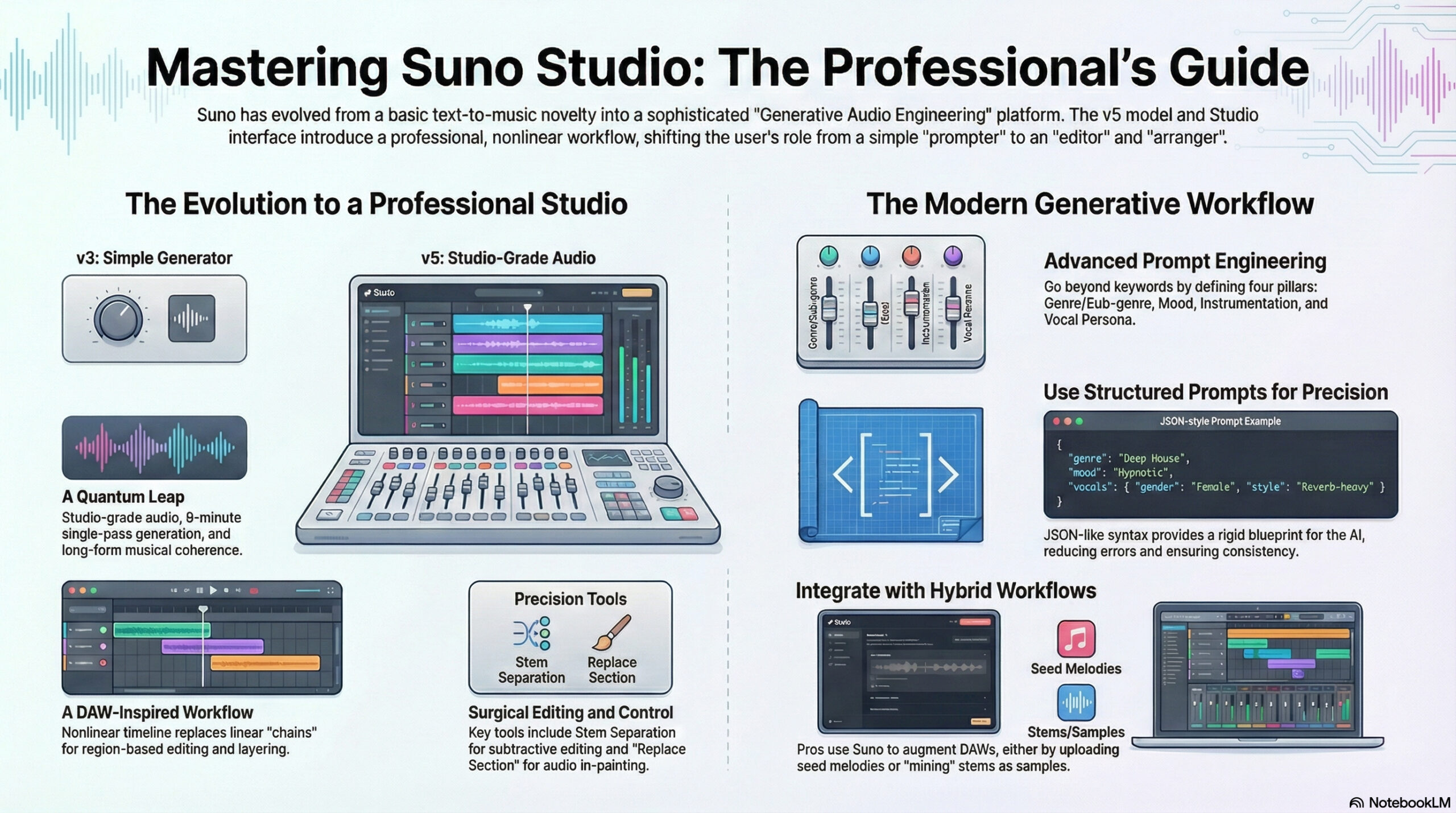
This format enforces a rigid blueprint for the AI, reducing the “style bleed” where descriptive words are misinterpreted as lyrics. It is highly effective for maintaining a consistent sound across multiple generations, such as for an album project.
{
  "genre": "Deep House",
  "bpm": 124,
  "mood": "Hypnotic",
  "elements": ["Driving Bassline", "Atmospheric Pads", "Syncopated Hi-Hats"],
  "vocals": {
    "gender": "Female",
    "style": "Reverb-heavy",
    "delivery": "Intimate"
  }
}
2.4.2 Narrative Prompting
This method leverages the model’s natural language processing to follow a descriptive, story-like progression. It is highly effective for cinematic, ambient, or progressive genres where standard song structures are less relevant.
Start with a lonely acoustic guitar playing a slow arpeggio. At the 30-second mark, introduce a cello playing a counter-melody. Slowly build tension until the 2-minute mark, then explode into a full orchestral climax with thundering percussion.
2.4.3 Negative Prompting Protocol
The strategic use of negative prompts is critical for maintaining genre purity and ensuring a clean audio signal.
- To create an instrumental track:
No vocals - To remove high-frequency noise artifacts:
[No white noise]or[Clean Mix] - To ensure an acoustic track remains free of electronic elements:
[No synths]
With a robust prompt architecture established, the project must move into the Studio environment for generation and editing.
3.0 Phase 2: Generation and In-Studio Editing
3.1 Introduction to the Studio Environment
The Suno Studio interface represents a mandatory conceptual shift from the platform’s previous linear “Chain” logic to a nonlinear, DAW-like paradigm. All generated audio must be treated as “audio clay”—raw material for editing, not a finished product. The primary components for this process are the Timeline, Regions, and Layers, which facilitate our required professional editing workflow.
3.2 Standard Generation & Editing Procedure
Timeline-based editing allows for the precise assembly of generated audio clips into a cohesive final track.
- Region-Based Editing: Audio appears as non-destructive “Regions” that can be trimmed, moved, and spliced. This enables the use of “Comping” (composite editing), where the best sections from multiple generations are combined to create a superior final take.
- Visual Feedback from Waveforms: The waveform display provides crucial visual cues for dynamics and transients, allowing for precise cuts and seamless transitions.
- Layering: The multi-track system allows for the generation of separate elements (e.g., a rhythm section on Track 1, vocals on Track 2) for greater compositional control.
3.3 The “Upload-Led” Composition Workflow
This workflow reverses the standard text-to-audio process, placing a human musical idea at the start of the creative chain.
- Seed Recording: Record a core musical idea (e.g., a hummed melody, a chord progression on a keyboard, a guitar riff) into a DAW or voice memo application.
- Ingestion: Upload the recorded audio file to Suno Studio.
- Influence Calibration: Set the Audio Influence slider to 70–80%. This forces the AI to adhere strictly to the uploaded melody and rhythm while replacing the raw recording with high-quality generated instruments. Setting influence too high stifles the AI’s ability to add necessary production polish and results in output that is too close to the low-quality source audio; this is the “100% Myth” and is to be avoided.
- Generation & Iteration: Prompt for the desired arrangement (e.g., “Add drums, bass, and orchestral strings”) and use refinement tools to iterate.
3.4 In-Painting Procedure: The “Replace Section” Tool
The “Replace Section” tool is Suno’s implementation of audio in-painting, used for surgical audio repair and lyric changes while preserving the surrounding track.
- Selection Strategy: Highlight a region of 10–30 seconds. Selections that are too short (<5 seconds) often result in disjointed transitions, while selections that are too long may cause the model to lose the original melodic context.
- Prompt Modification: Alter the lyrics within the lyrics field for the selected region or add specific instructional meta-tags like
[Surgical Guitar Solo]to regenerate only that portion.
3.4.1 Workaround Protocol: Resolving the Lyric Cache Issue
A known “Lyric Cache” issue can prevent the tool from recognizing lyric changes on subsequent attempts. To force a refresh, perform a “dummy edit”: make a trivial change to the lyrics (e.g., add a period), save, then delete the change and save again before regenerating.
3.5 Out-Painting Procedure: The “Extend” Tool
The “Extend” tool continues a track beyond its generated endpoint, analyzing the final 30-60 seconds to ensure continuity. This is essential for creating complex arrangements or genre switches.
Procedure for Genre-Switching Extensions
- Radically alter the style prompt to reflect the new genre.
- Lower the Style Influence slider to allow the model to diverge from the sonic palette of the previous clip.
Mastering these editing techniques is fundamental, but maintaining vocal consistency across these edits requires adherence to the protocols in the next phase.
4.0 Phase 3: Vocal Persona Management
4.1 Introduction to Vocal Consistency
For any commercial music project, a consistent vocal identity is paramount. The Persona feature is the primary tool for achieving this goal. However, its known limitations demand a rigorous management process to prevent “Persona Drift” and maintain a stable vocal performance. These protocols are not optional.
4.2 Persona Creation Protocol
Follow these best practices to create a robust and reusable Persona.
- Source Material Selection: Derive Personas exclusively from tracks with sparse instrumentation and clear, dry vocals. If the source track contains heavy reverb or distortion on the vocals, these effects will be “baked into” the Persona and applied to all future generations, severely limiting its utility.
- The “Anchor” Technique: To combat “Persona Drift,” the reuse of the exact vocal descriptor tags from the original prompt (e.g.,
Raspy male baritone) is mandatory. These tags must be included in the prompt alongside the selected Persona file to reinforce the model’s vocal weights.
4.3 Persona Stability Troubleshooting
Personas can occasionally revert to a generic, default voice. If this occurs, the following workaround has been proven effective:
- Select the original track from which the Persona was created.
- Activate the Cover feature.
- Ensure the desired Persona is selected.
- Generate a cover. This creates a “feedback loop” that reinforces the vocal identity within the model, stabilizing the Persona for use in new generations.
With the track fully arranged and the vocals stabilized, the project must exit the Suno environment for final processing.
5.0 Phase 4: Post-Production & Mastering
5.1 Introduction to Hybrid Workflows
The non-negotiable professional standard for release-ready music is a “Hybrid Workflow” that integrates Suno Studio with a traditional DAW. Relying solely on Suno’s internal mix is insufficient for a commercial release. The platform’s aggressive mastering limiter and tendency for frequency masking in the 200-500Hz range are the primary technical reasons why external DAWs are mandatory for achieving a commercially competitive sound.
5.2 Stem Export & “Stem-Mining” Procedure
The high-fidelity stem separation in v5 enables Subtractive Production, where unwanted elements can be surgically removed by deleting their corresponding stem. This feature is also the foundation of the “Stem-Mining” workflow, which treats Suno as an infinite sample library.
The “Stem-Mining” procedure is as follows:
- Texture Generation: Prompt for isolated, specific musical elements rather than full songs.
- Stem Extraction: Generate the track and use the v5 stem splitter to isolate the desired element (e.g., the bass stem).
- External Processing & Assembly: Export the isolated stem to a DAW. There, it can be chopped, re-sequenced, and processed with third-party effects before being assembled with other elements to build a final track.
5.3 Mandatory External Mastering
External mastering is a required final step for all commercial releases generated from Suno Studio. The primary audio issue that must be corrected is frequency masking.
- Identify the Problem Area: Suno v5 output frequently exhibits a “muddy” buildup in the 200–500Hz low-mid frequency range, which obscures clarity and punch.
- Apply Corrective Processing: Use professional mastering tools, such as iZotope Ozone, to apply dynamic EQ and multiband compression. This will correct the spectral imbalance and bring the track to commercial loudness standards.
A track is not considered technically complete until it has passed the mandatory QA protocols detailed in the next section. No exceptions.
6.0 Quality Assurance & Troubleshooting Protocols
6.1 Introduction to Anomaly Resolution
Despite the sophistication of the v5 model, specific technical anomalies can occur during generation. This section provides the standardized, community-tested solutions for resolving the most common issues. These are not suggestions; they are the required procedures.
6.2 The “Skipping/Looping” Glitch
This anomaly presents as a “scratched CD” effect, where the track gets stuck in a repetitive loop or skips rhythmically, typically within the first 20 seconds.
The “Crop and Extend” Fix is the standard resolution procedure:
- Identify the exact point where the glitch occurs.
- Use the Crop tool to remove the entire section of the track up to the glitch point.
- Use the Extend tool to regenerate a new
[Intro], forcing the model to recalculate the audio path and bypass the original error.
Procedural Note: Always download the WAV file to confirm the glitch exists in the source audio before deleting a generation. The issue can sometimes be a web-based playback artifact.
6.3 Spectral Drift / Quality Degradation
In long chains of extensions, the audio quality can degrade, becoming “muddy” or “lo-fi.”
The prescribed solution is the “Refresh” Strategy: Use the Cover feature on the degraded generation itself. This forces a complete re-synthesis of the audio from scratch, using the existing melody but with fresh acoustic modeling, effectively cleaning the signal path.
6.4 Hallucinated “Ghost Vocals”
The model will occasionally add unwanted “ghost vocals” to tracks intended to be instrumental.
- Prevention: Use explicit negative prompts like
No Vocalsin the style description during the generation phase. - Correction: If ghost vocals appear, use the
Replace Sectiontool on the affected area. Enter the[Instrumental]tag in the lyrics field for that selection to regenerate it without vocals.
After resolving all technical issues, the final step is to verify commercial compliance.
7.0 Phase 5: Commercialization & Compliance
7.1 Introduction to Commercial Release
Technical completion of a track is not the final step. This section outlines the critical compliance checks required to ensure all commercial releases are aligned with Suno’s terms of service and current legal frameworks regarding AI-generated content.
7.2 Commercial Rights Verification
Mandatory Pre-Distribution Check
- Only generations created under a paid Pro or Premier plan carry commercial rights, permitting distribution to platforms like Spotify and Apple Music for royalty collection.
- Before any track is slated for distribution, the production team must verify that the generating account held an active Pro or Premier subscription tier at the time of creation.
- This verification step must be documented and archived for every commercial release.
Non-Commercial Restriction
- Tracks made on the Free tier are strictly restricted to non-commercial, personal use and cannot be monetized under any circumstances.
7.3 Copyright & Human Authorship
There is a critical distinction between the contractual ownership granted by Suno and formal copyright protection.
U.S. Copyright Office Position The general position of the U.S. Copyright Office is that raw, unmodified AI output is likely not eligible for copyright protection.
Human Authorship Standard To secure copyright protection, a track must meet the “Human Authorship” threshold. This is achieved by incorporating significant human-created elements via a Hybrid Workflow. Examples include user-written lyrics, user-composed melodies uploaded to the platform, and significant creative arrangement and editing of exported stems within a DAW.
8.0 Appendix: Quick Reference Tables
8.1 Studio Keyboard Shortcuts
| Action | Shortcut (Mac) | Shortcut (Windows) | Function Description |
| Play/Pause | Space | Space | Toggles transport playback. |
| Split Region | Cmd + E | Ctrl + E | Cuts the selected region at the playhead; essential for editing out mistakes. |
| Duplicate | Cmd + D | Ctrl + D | Instantly copies the selected region; useful for extending loops manually. |
| Loop Selection | Cmd + L | Ctrl + L | Cycles playback over the selected timeframe. |
| Solo Track | Cmd + Shift + S | Ctrl + Shift + S | Isolates the selected track for critical listening. |
| Mute Track | Cmd + Shift + M | Ctrl + Shift + M | Silences the selected track. |
| Toggle Panels | 1, 2, 3 | 1, 2, 3 | Rapidly switches between Create, Library, and Timeline views. |
8.2 Suno Account Tiers
| Plan Tier | Cost | Credits/Month | Approx. Songs | Commercial Rights | Model Access | Key Features |
| Basic (Free) | $0 | 50/day | ~10/day | No | v4.5-all (Limited) | Standard Queue, No Stems |
| Pro | $10/mo | 2,500 | ~500 | Yes | Full v5 Suite | General Commercial License, Stems, Personas |
| Premier | $30/mo | 10,000 | ~2,000 | Yes | Full v5 + Priority | Priority Generation, Extended Uploads, Bulk Actions |
Discover more from Stoke McToke
Subscribe to get the latest posts sent to your email.